OBS overlay builder — customize layouts and own your Browser Source
Build custom OBS overlays in the browser with full control over chat placement, branding, Kick channel wiring, and export. Self-contained HTML you keep — not a locked pack.
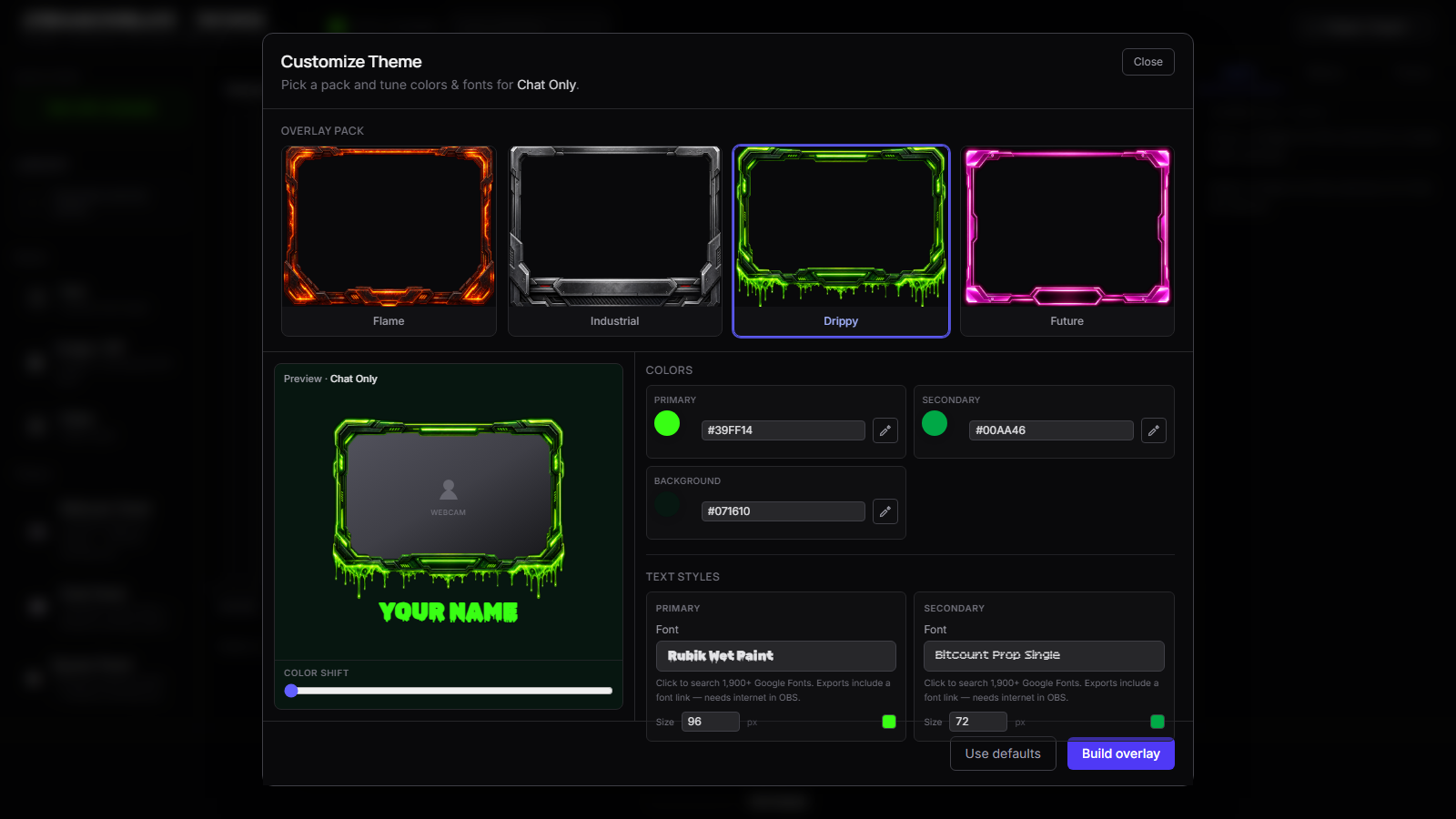
An OBS overlay builder is for streamers who care about control — chat on the right edge vs left, brand colors that match your panels, Kick stats where you want them, and an export you can version like any other project file.
Stream Overlays is a free browser builder that outputs self-contained HTML for OBS Browser Source. Start from a template, customize the layout and branding, export, drop into OBS. No account required for the core loop.
Builder vs generator — pick your intent
| You want… | Start here | |-----------|------------| | Fastest path to a working overlay tonight | OBS overlay generator | | Control over branding, layout zones, and composition | This page — OBS overlay builder |
Generators optimize for template → light tweak → export. Builders assume you'll spend time in the editor making the overlay yours. Same tool under the hood; different expectation on depth.
How building an OBS overlay works
- Choose a template that matches your stream format — Just Chatting, gaming, or Starting Soon.
- Set your Kick channel so live chat, followers, and viewer counts render in the preview.
- Open theme controls — hue, accent, fonts — until the overlay matches your stream brand. See our branding guide for what moves the needle.
- Adjust on-canvas elements: lower-third text, Starting Soon headline, chat frame styling.
- Export HTML or ZIP, save to a permanent folder, and add Browser Source in OBS pointing at the local file.
When to use the OBS overlay builder
Reach for the builder when control matters more than speed:
- You're rebranding and need colors/fonts that no pack seller ships
- You want gaming chat + lower-third + stats composed intentionally, not cropped from a generic PSD
- You plan to maintain multiple exports (Starting Soon scene + live layout) with consistent branding
- You've outgrown a purchased pack and want editable live chat, not static PNG frames
Make → Export → Kick without lock-in
Make the overlay — the builder is the product surface, not a teaser for a paid tier.
Export the file — self-contained HTML/ZIP on disk. OBS loads it via Browser Source; you are not renting widget hosting.
Kick without lock-in — Kick-native chat and stats in the export. Free means free: design, customize, export without checkout.
Templates are on-ramps — they preload the canvas so you build on a pro layout instead of a blank screen.
OBS workflow, not cloud dashboard theater
OBS streamers think in sources and scenes. This builder respects that: you get a local file OBS can load, resize, crop, and duplicate across scenes. Shutdown source when not visible works because it's standard Browser Source behavior.
Heavy cloud overlay suites make sense when you want alerts, tipping, and CRM in one vendor. This builder makes sense when you want a Kick overlay you own — backup the HTML, edit next month, swap scenes without asking permission.
For setup details after export, follow how to add an overlay to OBS and export format choices.
FAQ
What can I customize in the OBS overlay builder?
Kick channel, theme colors, fonts, branding text, and layout elements per template — chat frames, stats, lower-thirds, and Starting Soon copy depending on which template you start from.
Do I need design software like Photoshop?
No. The builder is the design surface. Export produces the OBS-ready HTML — you don't touch code unless you want to.
Can I start from a template and rebuild the layout?
Yes. Templates open in the builder as editable starting points. Swap templates anytime; each export is a fresh file you point OBS at.
Is Stream Overlays trying to replace Streamlabs or StreamElements?
No — we're the sharp tool when you want a portable HTML overlay for Kick you control. Cloud suites are fine if you love the whole dashboard; we're for owning the Browser Source file.
Ready to build your overlay?
Pick a template, customize it, and export a self-contained HTML file for OBS.